


Don’t Panic, But Don’t Ignore It Either
I spend a lot of time talking about Windows products going End of Life (EOL) or End of Support (EOS), but this time the conversation is a little different. Secure Boot certificates were not something most customers ever thought about until Microsoft announced the original certificates would begin expiring in June 2026. Since then, I’ve been getting a steady stream of questions.
The first question almost everyone asks is: “Are my devices going to stop booting?”
The short answer is no. In most cases, devices are not suddenly going to fail in June 2026 or turn into bricks overnight. But for OEMs building or supporting Windows IoT devices with Secure Boot enabled, especially long-life LTSC systems, this is something you should understand and start planning for now rather than later.
First, What Is Secure Boot?
Secure Boot has been around since the Windows 8 days, but unless you work directly with firmware, BIOS configuration, or device imaging, there is a good chance you have never really thought much about it.
At a very high level, Secure Boot helps protect the device before Windows even starts loading. It uses trusted certificates stored in the firmware to verify that the boot software is legitimate and has not been tampered with. If something untrusted tries to load during startup, Secure Boot is designed to block it. Think of it as a trusted handshake between the firmware and the operating system during boot.
Now here’s the important part for the embedded and IoT world. Unlike the commercial PC space, where Secure Boot became a major Windows 11 requirement, in the Windows IoT LTSC world, Secure Boot has often remained optional. A lot of embedded devices out there never enabled it in the first place. That means there are OEMs reading this blog right now who probably don’t need to worry about this at all.
But there are also plenty of OEMs who intentionally enabled Secure Boot because they wanted a stronger security posture for devices running in medical, retail, industrial, transportation, kiosk, or other dedicated-purpose environments. If that’s your deployment, keep reading.
So, What Is Expiring?
Microsoft originally issued Secure Boot certificates back in 2011, and those certificates begin expiring in June 2026. Microsoft is now replacing them with updated 2023 certificates that are already being distributed through Windows updates and newer servicing processes.
That’s really what this announcement is about. Microsoft is refreshing the trust infrastructure behind Secure Boot. The confusion comes from assuming expired certificates automatically mean systems stop functioning. That is not how this works.
What Happens If You Do Nothing?
Again, your devices will probably keep booting and running normally for quite some time. That’s the important part to understand because there is a lot of unnecessary panic floating online right now.
The bigger issue is that devices still relying on the older Secure Boot certificates may eventually lose the ability to receive future protections tied to the Windows boot process. Over time, this can affect boot-level security mitigations, revocation lists, and other updates tied to the Secure Boot trust chain.
For a normal office laptop that gets replaced every few years, maybe that’s just another IT maintenance task. For a Windows IoT LTSC device expected to remain deployed in the field for 7 or 10 years, it becomes a lifecycle planning issue.
Why Embedded and IoT OEMs Need to Pay Attention?
One thing I’ve learned over the years in the embedded space is that IoT devices do not behave like normal PCs. They are often offline, air-gapped, heavily locked down, or running in environments where updates undergo lengthy validation cycles before deployment.
I’ve seen situations in manufacturing environments where even a minor update requires months of testing before getting approvals. I’ve seen medical devices where servicing changes involve regulatory review. I’ve seen retail and kiosk systems where the image deployed today may remain mostly unchanged for years. That’s why this matters more in the IoT LTSC world.
If your devices are online and receiving normal Windows updates, the process may be straightforward. But if your systems are offline, tightly managed, or using custom firmware configurations, you should start reviewing this now rather than wait until the expiration date nears.
The First Thing I Would Do
I’d start with one simple question: “Did we enable Secure Boot on this product?”
If Secure Boot is not enabled, this may be a non-event for you. If Secure Boot is enabled, then I recommend you start inventorying affected systems, reviewing servicing methods, checking firmware versions, and validating whether the updated certificates are already being applied through your update process.
To check if Secure Boot is enabled, follow the path below. Also review your original OEM image and firmware configuration documentation:
Windows Security > Device Security > Secure Boot
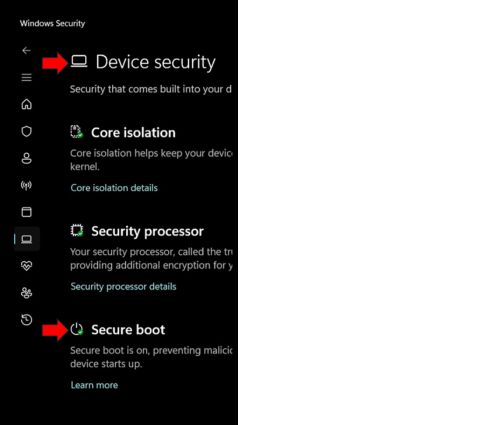
Do not assume that because Microsoft released an update, everything will automatically work perfectly across every hardware platform and image configuration. Some systems may also require firmware updates in addition to standard Windows servicing updates, which is why OEMs should carefully validate the process on production hardware before broad deployment.
What Devices Should OEMs Be Most Concerned About?
The devices that deserve the closest attention are those in which Secure Boot was intentionally enabled by the OEM. Here’s a comprehensive list:
- Windows 11 IoT Enterprise LTSC 2024 devices with Secure Boot enabled
These are probably the most important systems to review. While Secure Boot was optional in the Windows IoT LTSC world, many OEMs enabled it intentionally for stronger device security. - Windows 11 IoT Enterprise GAC devices have not yet been updated to newer builds like 25H2
These systems should be carefully reviewed to ensure the newer Secure Boot infrastructure is being applied correctly. - Windows 10 IoT Enterprise devices using Secure Boot
These systems are also part of the older Secure Boot certificate chain and should be included in your review process. - Older Windows 8-based or legacy embedded systems with Secure Boot enabled
These devices are often forgotten because they have been running reliably for years, but they still rely on the older certificate infrastructure. - Air-gapped, offline, or tightly managed devices
These are the systems I worry about the most. If your devices are disconnected from normal update processes or use highly controlled servicing procedures, you need a clear plan to validate and deploy the updated certificates manually. - Devices with long deployment lifecycles
If your systems are expected to remain in the field for 7 to 10 years or longer, this should be reviewed as part of your lifecycle planning process.
How Can You Check Whether the New Certificates Are Installed?
Microsoft made this easier by exposing Secure Boot status directly in Windows Security. You can check the status by opening the same path indicated in the earlier section:
Windows Security > Device Security > Secure Boot
If the system has been properly updated, you should see a green dot or check mark indicating that Secure Boot protections are active and up to date. See my YouTube video that walks through how to verify Secure Boot certificate status and what to look for on the device.
To Summarize
This is not a panic situation, but it is one of those infrastructure changes that Windows IoT OEMs should take seriously, especially for long-life LTSC deployments.
If Secure Boot is disabled, you may not need to do anything. If Secure Boot is enabled, now is the time to understand your deployment, validate your update strategy, and make sure your devices are prepared well before the older certificates expire.
If you have questions about Secure Boot certificates, Windows IoT LTSC deployments, or long-life embedded servicing strategies, reach out to the Arrow Microsoft IoT team.
Questions? Reach out to our experts at Arrow Electronics. We will respond to your inquiry within 24 hours.