
Featured Blogs

Navigating 40 Years of Windows: An Insider's Perspective for Your IoT Roadmap
September 2026
The year 2025 marked the 40th anniversary of Microsoft Windows, from Windows 1.0 through Windows 11. It's a fun trip down memory lane: floppy discs, Novell NetWare logins, an IBM PCjr keyboard that ran on the same wireless signal as a TV remote. But one detail buried in that nostalgia matters far more to my world than to the average PC user: lifecycle and support for a decade.
That detail is the story I want to tell. Here's why it matters for anyone building or maintaining IoT and embedded devices. Microsoft understands the embedded IoT space, and they know OEMs want an efficient, reliable, stable, yet feature-rich O/S. Still, more than any feature, it’s about the lifecycle and knowing their OEM device can be made available for a decade.
The 40-Year Version, Fast-Forwarded
A quick recap of the highlights: Windows 1.0 launched in 1985. Windows 95 brought the PC mainstream. XP and Windows 7 are still the two I hear people point to as Microsoft's best work, with Vista as the well-known miss in between. Windows 8 bet early on touchscreens before the hardware caught up, 8.1 walked part of that back, and Microsoft skipped straight from 8 to 10, famously calling Windows 10 "the last version of Windows" before it racked up 14 build versions and retired on October 14, 2025. That brings us to the current Windows 11, which has been out for five years now, and the 6th build version launches this fall.
It's a good story. But it's built for consumer PCs, which get replaced every few years. Embedded and IoT hardware doesn't work that way, and that's where the conversation I want to have begins.
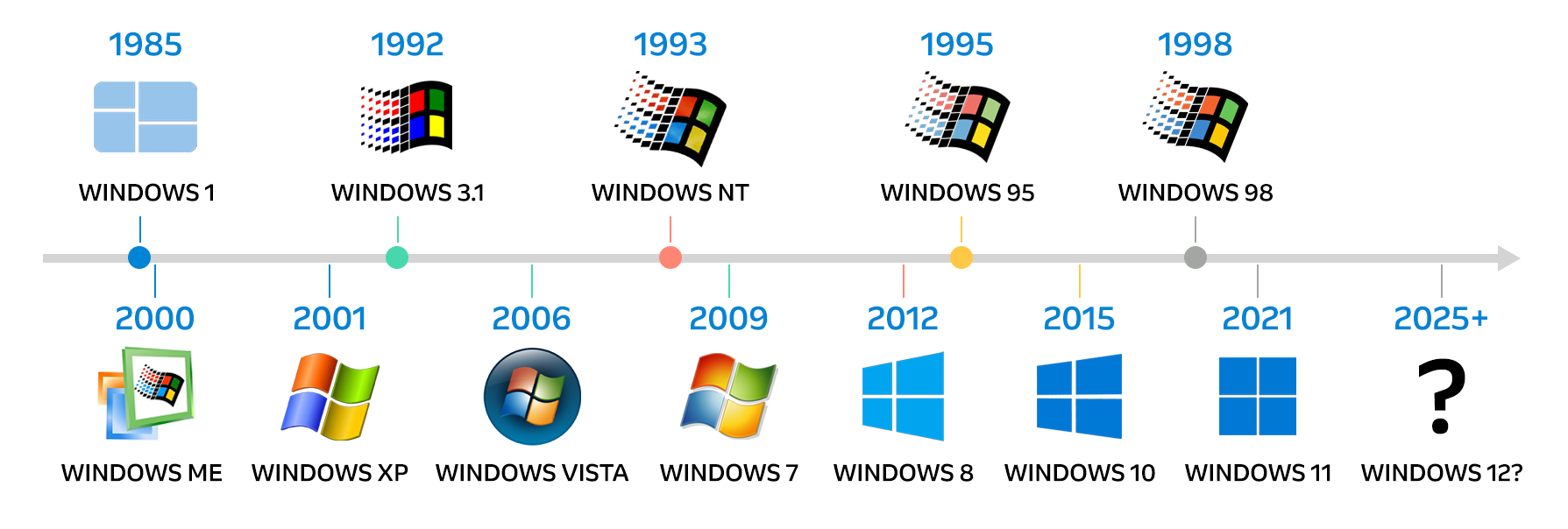
Why Windows 7 had 15 years of very successful life in the Embedded World
For a point-of-sale terminal, a kiosk, industrial equipment, or a medical device, a three-to-five-year refresh cycle isn't realistic; these platforms are often designed to run for a decade or more without a hardware swap. Microsoft has long addressed this with a separate track for embedded and IoT devices: the Long-Term Servicing Channel (LTSC), alongside legacy LTSB releases. These editions decouple embedded hardware from the rapid, feature-driven update cadence of consumer Windows, which is exactly why I can still help customers source specialized Windows 7 and Windows 10 embedded builds long after their consumer counterparts were retired.
It's a detail easy to miss in a "40 years of Windows" retrospective, but to me it's the whole reason a dedicated embedded licensing channel exists in the first place.
The Clock I Tell OEMs to Watch
With Windows 10 now retired for general use, the question I get most from embedded and IoT teams isn't "will Microsoft release Windows 12?" Instead, the question I hear is "which Windows 10 IoT edition am I running, and when does its support clock actually run out?" Per Microsoft's current lifecycle documentation, the dates differ considerably by edition:
- Windows 10 IoT Enterprise (General Availability Channel): support already ended October 14, 2025.
- Windows 10 IoT Enterprise 2016 LTSB: support ends October 13, 2026, after which Extended Security Updates are available via Arrow’s ESU options.
- Windows 10 IoT Enterprise LTSC 2019: supported through January 9, 2029.
- Windows 10 IoT Enterprise LTSC 2021: supported through January 13, 2032.
Microsoft's recommended forward path for new designs is Windows 11 IoT Enterprise LTSC 2024. I still see teams treat "Windows 10 support" as a single date, and that's one of the more common planning mistakes I encounter; the right answer depends entirely on which edition and build a given fleet is running.
So, Is Windows 12 (or "Windows vNext") Coming?
I raised a fair question in my video: with Windows 11 on its fourth build and a fifth (25H2) on the horizon, would Microsoft finally ship a numbered Windows 12, or lean into the AI branding trend with something like "Windows AI?” Now that the dust has settled, I can tell you: not yet. Windows 11 25H2 shipped in Fall 2025 as planned, and Microsoft has continued the same approach into 2026 with version 26H2 (being delivered as a lightweight enablement update). Microsoft hasn't confirmed a Windows 12 name or release date, and current roadmap reporting points to Windows 11 remaining the platform of record through 2026 and likely into 2027.
For IoT and embedded planning, that is good news: it means the LTSC lifecycle dates above are the real planning anchor, not a hypothetical next-gen OS.
Bringing Decades of Expertise to Your IoT Strategy
Forty years in, the throughline hasn't changed for me: Microsoft keeps building consumer and embedded Windows on different clocks, and getting that distinction right is the difference between a device that's supportable for a decade and one that quietly falls out of security patching. That's the exact problem I work through every day with OEMs and device makers here at Arrow’s intelligent solutions business, matching the right Windows IoT edition and licensing model to a product's real hardware lifecycle, and planning the migration path before an end-of-support date forces the issue.
If your fleet is still running a 2016-era or non-LTSC Windows 10 IoT build, now's the time to map out where it sits on that timeline. Reach out to the Arrow team and me to talk through your options at windowsiot@arrow.com.
Learn More

Microsoft Silently Overhauls Telephone Activation, Here's What OEMs Need to Know
July 2026
Back in December 2025, Microsoft quietly reworked the telephone activation process for Windows, Office, Server, and Remote Desktop Services products, with no announcement and no fanfare. Customers who rely on this process for offline devices, air-gapped systems, or downgrade scenarios started noticing that the old phone number simply stopped working. I've gotten enough questions about it that it's time to walk through exactly what changed, why it changed, and how to get through it the first time.
The short version: the phone call is gone, but the capability is not. Microsoft has moved the whole process to a web portal. I've been calling it the “portal activation process” since Microsoft hasn't given it an official new name yet. Here's what you need to know.
Why Do You Still Need This Process?
Telephone activation (now portal activation) isn't something most users ever touch, but it's essential for a specific set of scenarios that are common in the Windows IoT and embedded world:
- Downgrading a product to an older version using a key that has already been previously activated
- Activating an offline or air-gapped device that has no internet connectivity
Both are everyday realities for OEMs and embedded customers, so this isn't an edge case; it's a process many of you will experience repeatedly.
Step 1: Start the Process With slui 4
Nothing has changed on the device side to kick things off. Open the Run prompt and type:
slui 4
SLUI stands for Software Licensing User Interface, and this command has always triggered the telephone activation screen. It will still display a phone number on screen, but don't bother dialing it. Calling that number now just gets you a recording directing you to the portal at https://aka.ms/aoh .
The important thing to grab from this screen is your Installation ID. That's the number you'll carry over to the portal in the next step. If your device is genuinely offline, you'll need a second computer or a phone to continue, something to keep in mind if you support customers working in secure areas where stepping out to get online isn't simple.
Step 2: Sign In to the Portal
This is the part that trips people up. When you get to the portal, Microsoft now requires you to sign in. This is new; in the past, telephone activation was essentially anonymous.
To be clear about what this sign-in does and doesn't do: your login is not tied to the license itself. It's tied to tracking the number of activations you personally perform. If you're doing this for normal, legitimate reasons, there's nothing to worry about. If you're running thousands of activations, don't be surprised if Microsoft reaches out to ask why.
The screen you'll land on can look like it's asking for a government tenant or a government Azure cloud login. It is not. You just need a standard Entra ID (formerly Microsoft account) to sign in. Ignore the government tenant option, and click through to proceed with a normal sign-in.
Step 3: Choose “Activate a Microsoft Product”
Once you're signed in, you'll see an option for volume license key management; skip that. You want “Activate a Microsoft Product.” From there, you'll see the full family of supported products:
- Windows
- Office
- Server
- Remote Desktop Services
This list also covers the Windows IoT lineup, Windows IoT Server, Windows IoT client, and the Office LTSC products, even though they aren't named.
Choosing Windows opens the full version history, including legacy operating systems like Windows 8.1, 8, 7, Vista, and XP. Since Windows licenses are perpetual, it's not unusual to be activating a much older OS under downgrade rights, and the portal accounts for that.
Step 4: Enter the Installation ID
This step has a quirky UI element worth calling out ahead of time. The screen presents six boxes, but you can't click on them individually to type. Instead, click into the top field and start typing your Installation ID. Once you've entered at least 14 digits, the system automatically populates the six boxes below.
After the full Installation ID is entered, the portal generates a Confirmation ID.
Step 5: Finish Activation on the Device
Take that Confirmation ID back to the original device and enter it into the activation screen. If everything lines up, you'll see confirmation that the product has been successfully activated.
|
Windows Champ Tip: The whole workflow still supports downgrade rights and offline activation exactly like before; the only real difference is that you're now typing into a browser instead of talking to a phone tree and hunting for the right country code. |
What This Means for Offline and Air-Gapped Environments
For most customers, this is a net improvement. You no longer must navigate an automated phone system or figure out international dialing codes. But for organizations with secure or restricted areas, the sign-in requirement adds a wrinkle: someone may now need to physically leave that secure space to reach a second device with internet access and a browser, rather than simply picking up a phone from within it. It's worth building that extra step into your activation procedures if it applies to your environment.
To Summarize
Microsoft removed the phone call from telephone activation in December 2025 without any formal announcement, replacing it with a web-based portal. The process still supports the same core scenarios, downgrade rights, and offline/air-gapped activation, but now requires signing in with an Entra ID, which Microsoft uses to track activation volume rather than to tie the login to a specific license. Once you know to expect the sign-in screen and the quirky Installation ID entry field, the new process is quicker than the old one.
FAQs
Do I still need to call a phone number?
No. Calling the number shown on the slui 4 screen now returns a recording directing you to the web portal instead.
Will I lose the ability to activate offline or air-gapped devices?
No. Offline and air-gapped activation is still fully supported; you just complete the portal steps on a second, internet-connected device or phone rather than the offline device itself.
Does signing in link my account to the software license?
No. Your sign-in is used only to track how many activations you're performing, not to associate your identity with the license itself.
Do I need a government tenant or government Azure account to sign in?
No. A standard Entra ID (formerly a Microsoft account) is all that's required. The government tenant option on the sign-in screen does not apply to this process.
Which products does the new portal support?
Windows (including legacy versions back through XP), Office, Server, and Remote Desktop Services, which also covers the Windows IoT and Office LTSC product lines.
Questions? If you have additional questions on the Microsoft activation process or on Windows IoT in general, reach out to the Arrow Microsoft IoT team at windowsiot@arrow.com or visit Arrow.com/winiot. We will respond to your inquiry within 24 hours.

Secure Boot Certificates Expire in June 2026
June 2026
Don’t Panic, But Don’t Ignore It Either
I spend a lot of time talking about Windows products going End of Life (EOL) or End of Support (EOS), but this time the conversation is a little different. Secure Boot certificates were not something most customers ever thought about until Microsoft announced the original certificates would begin expiring in June 2026. Since then, I’ve been getting a steady stream of questions.
The first question almost everyone asks is: “Are my devices going to stop booting?”
The short answer is no. In most cases, devices are not suddenly going to fail in June 2026 or turn into bricks overnight. But for OEMs building or supporting Windows IoT devices with Secure Boot enabled, especially long-life LTSC systems, this is something you should understand and start planning for now rather than later.
First, What Is Secure Boot?
Secure Boot has been around since the Windows 8 days, but unless you work directly with firmware, BIOS configuration, or device imaging, there is a good chance you have never really thought much about it.
At a very high level, Secure Boot helps protect the device before Windows even starts loading. It uses trusted certificates stored in the firmware to verify that the boot software is legitimate and has not been tampered with. If something untrusted tries to load during startup, Secure Boot is designed to block it. Think of it as a trusted handshake between the firmware and the operating system during boot.
Now here’s the important part for the embedded and IoT world. Unlike the commercial PC space, where Secure Boot became a major Windows 11 requirement, in the Windows IoT LTSC world, Secure Boot has often remained optional. A lot of embedded devices out there never enabled it in the first place. That means there are OEMs reading this blog right now who probably don’t need to worry about this at all.
But there are also plenty of OEMs who intentionally enabled Secure Boot because they wanted a stronger security posture for devices running in medical, retail, industrial, transportation, kiosk, or other dedicated-purpose environments. If that’s your deployment, keep reading.
So, What Is Expiring?
Microsoft originally issued Secure Boot certificates back in 2011, and those certificates begin expiring in June 2026. Microsoft is now replacing them with updated 2023 certificates that are already being distributed through Windows updates and newer servicing processes.
That’s really what this announcement is about. Microsoft is refreshing the trust infrastructure behind Secure Boot. The confusion comes from assuming expired certificates automatically mean systems stop functioning. That is not how this works.
What Happens If You Do Nothing?
Again, your devices will probably keep booting and running normally for quite some time. That’s the important part to understand because there is a lot of unnecessary panic floating online right now.
The bigger issue is that devices still relying on the older Secure Boot certificates may eventually lose the ability to receive future protections tied to the Windows boot process. Over time, this can affect boot-level security mitigations, revocation lists, and other updates tied to the Secure Boot trust chain.
For a normal office laptop that gets replaced every few years, maybe that’s just another IT maintenance task. For a Windows IoT LTSC device expected to remain deployed in the field for 7 or 10 years, it becomes a lifecycle planning issue.
Why Embedded and IoT OEMs Need to Pay Attention?
One thing I’ve learned over the years in the embedded space is that IoT devices do not behave like normal PCs. They are often offline, air-gapped, heavily locked down, or running in environments where updates undergo lengthy validation cycles before deployment.
I’ve seen situations in manufacturing environments where even a minor update requires months of testing before getting approvals. I’ve seen medical devices where servicing changes involve regulatory review. I’ve seen retail and kiosk systems where the image deployed today may remain mostly unchanged for years. That’s why this matters more in the IoT LTSC world.
If your devices are online and receiving normal Windows updates, the process may be straightforward. But if your systems are offline, tightly managed, or using custom firmware configurations, you should start reviewing this now rather than wait until the expiration date nears.
The First Thing I Would Do
I’d start with one simple question: “Did we enable Secure Boot on this product?”
If Secure Boot is not enabled, this may be a non-event for you. If Secure Boot is enabled, then I recommend you start inventorying affected systems, reviewing servicing methods, checking firmware versions, and validating whether the updated certificates are already being applied through your update process.
To check if Secure Boot is enabled, follow the path below. Also review your original OEM image and firmware configuration documentation:
Windows Security > Device Security > Secure Boot
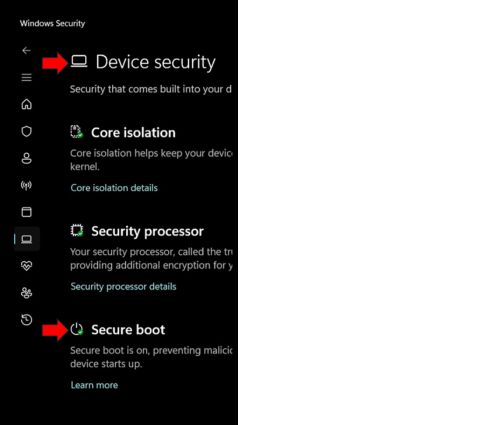
Do not assume that because Microsoft released an update, everything will automatically work perfectly across every hardware platform and image configuration. Some systems may also require firmware updates in addition to standard Windows servicing updates, which is why OEMs should carefully validate the process on production hardware before broad deployment.
What Devices Should OEMs Be Most Concerned About?
The devices that deserve the closest attention are those in which Secure Boot was intentionally enabled by the OEM. Here’s a comprehensive list:
- Windows 11 IoT Enterprise LTSC 2024 devices with Secure Boot enabled
These are probably the most important systems to review. While Secure Boot was optional in the Windows IoT LTSC world, many OEMs enabled it intentionally for stronger device security. - Windows 11 IoT Enterprise GAC devices have not yet been updated to newer builds like 25H2
These systems should be carefully reviewed to ensure the newer Secure Boot infrastructure is being applied correctly. - Windows 10 IoT Enterprise devices using Secure Boot
These systems are also part of the older Secure Boot certificate chain and should be included in your review process. - Older Windows 8-based or legacy embedded systems with Secure Boot enabled
These devices are often forgotten because they have been running reliably for years, but they still rely on the older certificate infrastructure. - Air-gapped, offline, or tightly managed devices
These are the systems I worry about the most. If your devices are disconnected from normal update processes or use highly controlled servicing procedures, you need a clear plan to validate and deploy the updated certificates manually. - Devices with long deployment lifecycles
If your systems are expected to remain in the field for 7 to 10 years or longer, this should be reviewed as part of your lifecycle planning process.
How Can You Check Whether the New Certificates Are Installed?
Microsoft made this easier by exposing Secure Boot status directly in Windows Security. You can check the status by opening the same path indicated in the earlier section:
Windows Security > Device Security > Secure Boot
If the system has been properly updated, you should see a green dot or check mark indicating that Secure Boot protections are active and up to date. See my YouTube video that walks through how to verify Secure Boot certificate status and what to look for on the device.
To Summarize
This is not a panic situation, but it is one of those infrastructure changes that Windows IoT OEMs should take seriously, especially for long-life LTSC deployments.
If Secure Boot is disabled, you may not need to do anything. If Secure Boot is enabled, now is the time to understand your deployment, validate your update strategy, and make sure your devices are prepared well before the older certificates expire.
If you have questions about Secure Boot certificates, Windows IoT LTSC deployments, or long-life embedded servicing strategies, reach out to the Arrow Microsoft IoT team.
Questions? Reach out to our experts at Arrow Electronics. We will respond to your inquiry within 24 hours.