
Once an image recipe is defined, EDIB autonomously builds, customizes, and produces a deployable image, removing guesswork and complexity for the user. The user can initiate the build process and monitor the progress either directly in the EDIB tool or programmatically through APIs. Once the build process starts, EDIB will translate the recipe into a set of supported customization endpoints and drive the image build process within a Hyper-V virtual machine (VM). The VM removes the need for technicians to interact with a physical reference device to complete this process manually, obviating the need for the image to require specific ordering and multiple boots to apply all configurations correctly.
EDIB will produce a deployable Windows image (WIM). Users have the option to create a bootable USB thumb drive in EDIB containing the output WIM. The USB stick can boot onto a test device to continue on-device customizations or testing tasks. Once image testing is complete, the USB stick can also be used to deploy to devices on the manufacturing line. For large-scale lab or manufacturing line deployment scenarios, the deployable WIM produced by EDIB, once validated, can be bulk deployed over the network onto devices using DISM (Deployment Image Servicing and Management) commands.
Please check this Microsoft blog from March 2022 – Announcing the Public Preview for Edge Device Image Builder to get started with the tool.
Download the Public Preview Build. Then use my quick start guide below to get your Technician PC setup and ready to use the tool.
- Load a computer with Windows 10 Pro or Enterprise or IoT Enterprise at least build 20H2, 21H1, or 21H2.
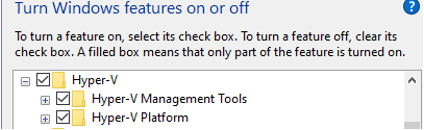
- Enable Hyper-V: Control Panel, Programs & Features, Turn on Windows features.
- Download & Install the Windows ADK – Specifically the version 2004

- Download and Install the Windows PE ad-on for the ADK – Also version 2004

- Download the OPK Media kit for LTSC 2021
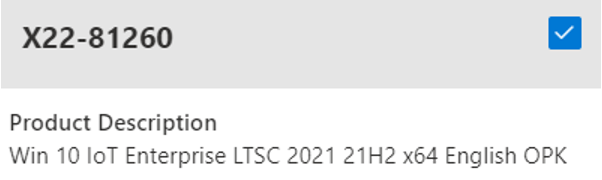
- Optional: Download the OPK Language Pack & Features on Demand

- Download the Microsoft Security Compliance Toolkit
- Unzip the Edge Device Image Builder ZIP package to C:\
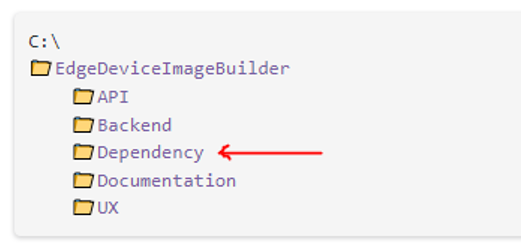
- Download the Packer Tool. Place “packer.exe” file in the C:\EdgeDeviceImageBuilder\Backend Folder
- Rename the ISOs as follows and place them in the Dependency Folder

- Launch the Tool by double-clicking EdgeDeviceImageBuilder.exe.
As an additional resource, please check out the video I created on the Edge Device Image Builder where I walk you through my quick start guide to get your Technician PC setup and ready to use the tool.
For additional questions regarding the tool or the Microsoft IoT products, please get in touch with our team via msembedded@arrow.com